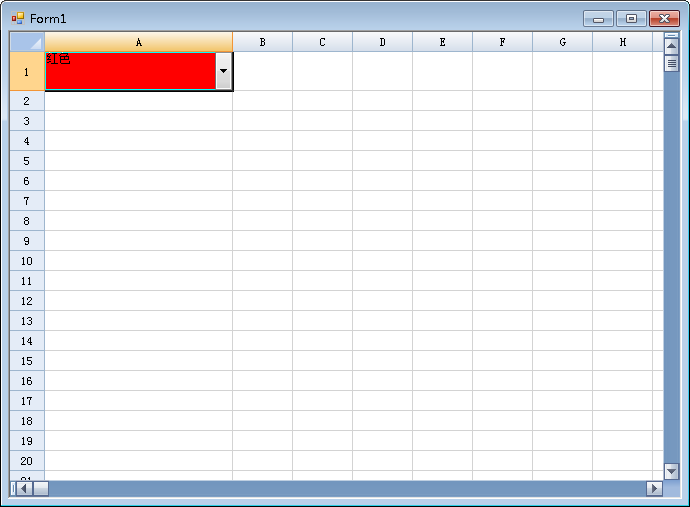
本文描述如何通过获取 ComboxCellType 单元格类型的选择事件进而更改当前单元格的背景色。有用户提出希望通过Combo的选择项不同更改不同的背景色,突出选择效果。
代码如下:
添加ComboCellType 单元格类型
/// <summary>
        /// 添加 ComboBoxCellType 单元格类型
        /// </summary>
        private void AddCellType()
        {
            FarPoint.Win.Spread.CellType.ComboBoxCellType comboBoxCellType1 = new FarPoint.Win.Spread.CellType.ComboBoxCellType();
            comboBoxCellType1.Items = (new String[] { "红色", "绿色", });
            fpSpread1.Sheets[0].Cells[0, 0].CellType = comboBoxCellType1;
            comboBoxCellType1.EditorValueChanged += new EventHandler(comboBoxCellType1_EditorValueChanged);
        }
通过事件判断选择文本更改背景色:
void comboBoxCellType1_EditorValueChanged(object sender, EventArgs e)
{
FarPoint.Win.Spread.CellType.ComboBoxCellType test = sender as FarPoint.Win.Spread.CellType.ComboBoxCellType;
if (this.fpSpread1.Sheets[0].ActiveCell.Text == "ᄎ↓ᆱ")
{
this.fpSpread1.Sheets[0].ActiveCell.BackColor = Color.Red;
}
if (this.fpSpread1.Sheets[0].ActiveCell.Text == "ᅡᅩᆱ")
{
this.fpSpread1.Sheets[0].ActiveCell.BackColor = Color.Green;
}
}
效果截图:
Demo下载: